

 Newton
Treehouse & its views
Choose the right surface for planning, making, and reviewing work.
The Treehouse is the branch’s shared workspace. Its views, also called stems, appear as icons across the top of the window. Hover for a label, then choose the view you need. Older instructions may call this area “Board”; in the current interface, Board is one layout inside Kanban.
Canvas: a place to shape
Canvas begins blank, with an invitation to talk to your branch guide. Ask for a checklist, dashboard, or another useful surface for this branch. It is a customizable starting place, not a fixed overview of every feature.
Notes, Files, and Editor
- Notes gives brief thoughts and context a place to stay. Use it for material worth keeping before it becomes a task or a finished document.
- Files keeps branch documents, images, and reference material in a folder-based browser. Select an item in the main area to open its preview and options on the right.
- Editor is for writing and revising documents. Open or create a document, format the work, and use bot assistance where available.
Kanban: follow the state of the work
Switch between Board and List at the upper left. Both show the same work. The board reads from left to right:
- Planned: saved, queued, or scheduled work.
- Working: a bot is actively executing the task.
- Needs you: a question, permission request, blocker, or prepared result awaits your attention.
- Done: accepted results and completion evidence.
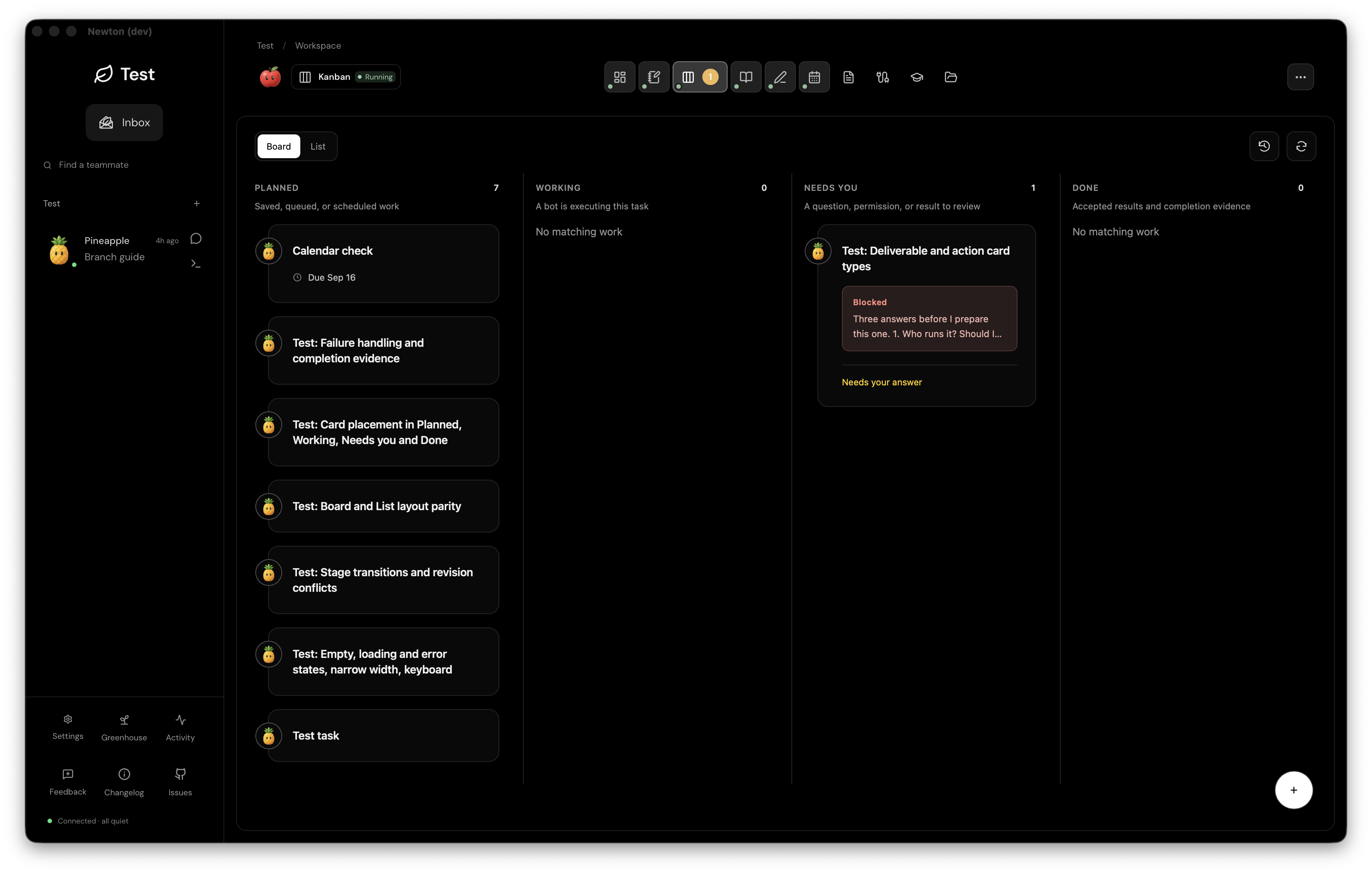
Open a card to read its instructions, owner, schedule, and current result. A deliverable asks for something to review; an action includes an execution step such as publishing. Preparation, approval, execution, and completion are distinct steps. Read the card’s available action before proceeding; its position alone is not evidence that an external action happened.
Calendar: give the same work a date
Calendar places scheduled work on a date grid and keeps unscheduled cards available below it. Use it to see timing and upcoming commitments. Adding a date does not mean the task has run; check its status and completion evidence.
The supporting views
- Knowledge connects sources, decisions, questions, and lessons. Explore the graph and insights.
- Session logs collects saved bot conversations. It is the current label for the older Artifacts view.
- Connections shows tools and services by bot or by tool. A listed connection may be inherited from the provider and is not proof that it works in the current session.
- Skills shows reusable instructions and their relationship to your bots. Skills explain how to work; Connections provide access to tools.
The controls at the upper right belong to the active view. Available stems and their order can change as you customize the branch. Use the visible labels rather than memorizing an icon’s position.