

 Newton
A guide to Newton
Find your way around branches, bots, and the work you keep together.
Newton gives your work a home on your Mac. Bring an idea, a research question, a writing project, or a piece of software. Keep conversations and shared context beside the files, tasks, schedules, and tools that help you make progress.
Start with a branch: a project with its own bots and shared workspace. Talk to a bot when you want help. Open the branch’s Treehouse when you want to work with what you are making together.
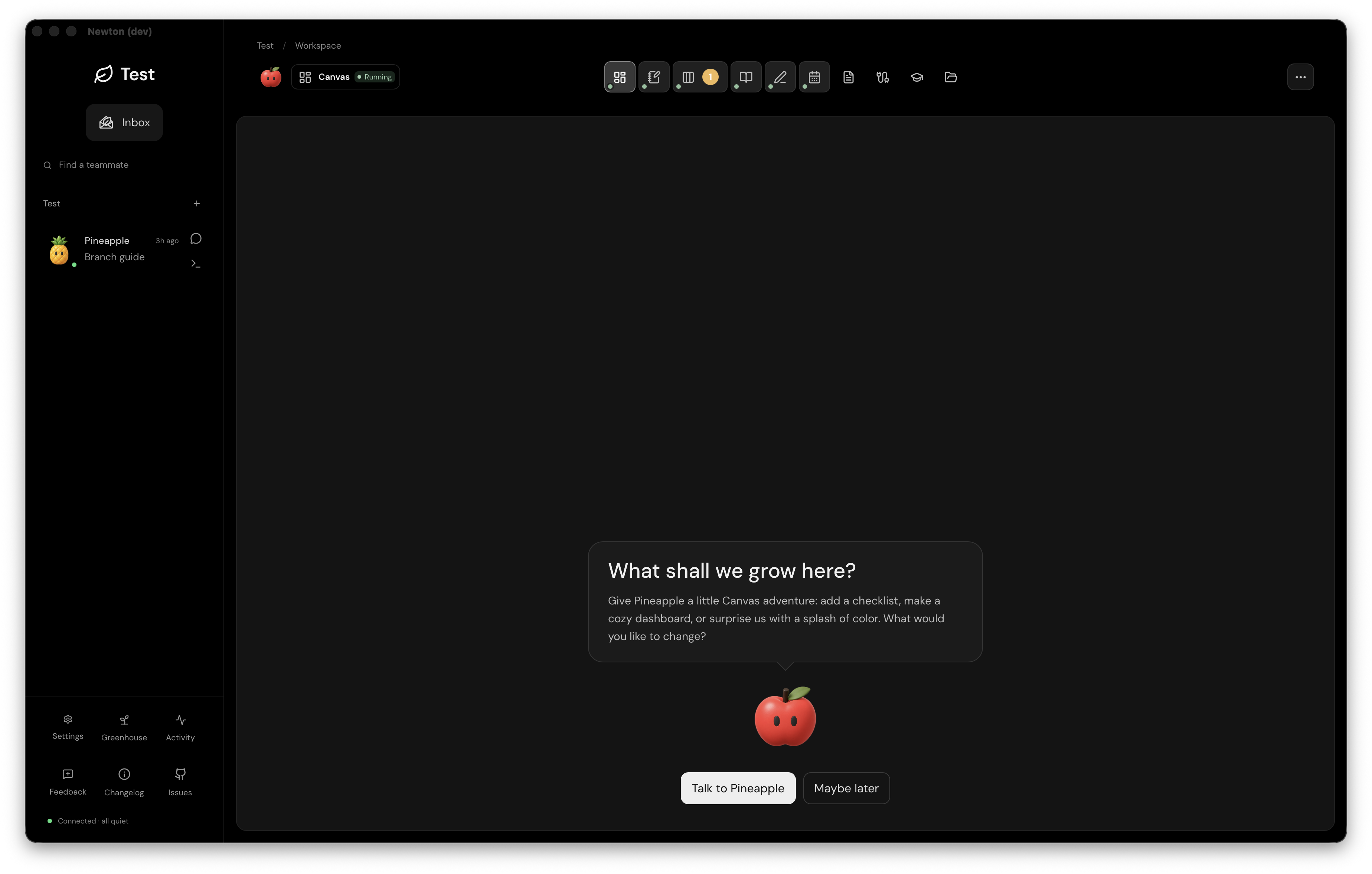
Find your bearings
- Left: choose your context. The branch name takes you to your branches. Inside a branch, the sidebar holds your teammates and their chat and CLI shortcuts.
- Top: change what you are looking at. The row of icons opens Canvas, Notes, Kanban, Knowledge, Editor, Calendar, Session logs, Connections, Skills, and Files. Hover an icon to read its name. The selected view’s name appears at the upper left of the workspace.
- Center: do the work. This space becomes your conversation, document, board, file browser, or knowledge graph. A view changes how you work with the branch; it does not create another project.
- Across branches: keep perspective. Inbox collects messages for you. Greenhouse puts bot terminals side by side. Settings and Activity sit near the bottom of the sidebar.
A useful first session
- Create a branch and tell its guide what you want to accomplish.
- Save useful context in Notes or Files. Ask the guide for a small, concrete first result.
- Use Kanban when the work needs a task and a review step; use Calendar when timing matters.
- Review the result, then keep lasting decisions and sources in Knowledge.
Choose a guide
- Branches & navigation — create a home for a project and move around it.
- Bots & conversations — choose a provider, talk to a teammate, and open its CLI.
- Treehouse & its views — find Canvas, Notes, Files, Editor, and the task views.
- Routines — give repeat work a schedule.
- Knowledge & insights — connect decisions to evidence and explore what they mean.
- Inbox, activity & Greenhouse — review updates and follow several bots.
- Appleseed for iPhone — continue conversations away from your desk.
- Access & your account — understand Newton access and provider accounts.
- Your Mac & running work — understand what keeps running and what needs your Mac.
Stem: a creative manager
Future feature · Working title
From a first idea to the finer details. Stem is a concept for creating and refining images with your bot, with the conversation, artwork, and feedback together in one place.
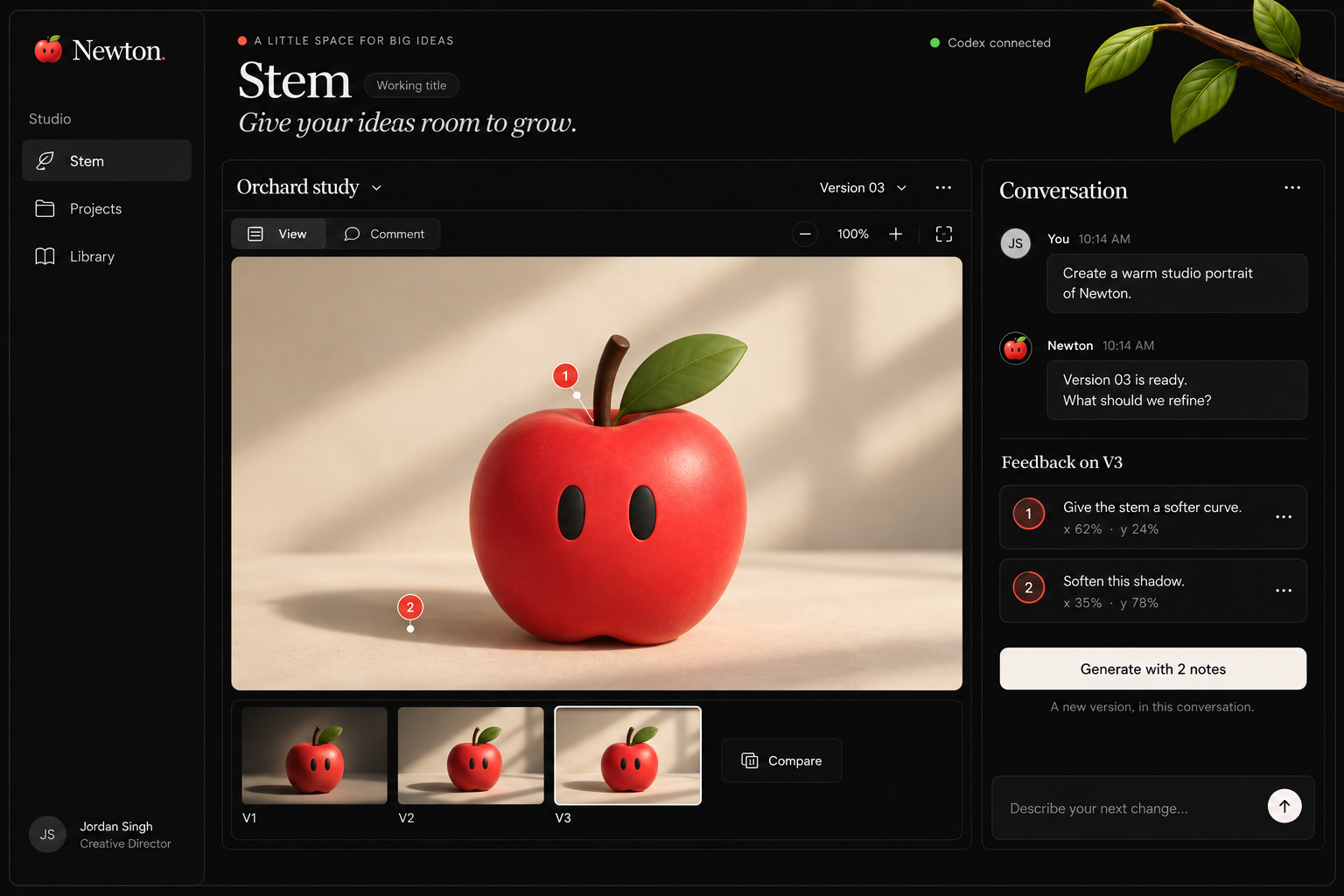
Ask. Pin. Refine.
The proposed workflow starts with an image-generation request to your bot through Codex. When the image comes back, click the part you want to change and leave a note. Each comment stays attached to that image version with an x/y percentage position, so your bot has both the feedback and its location.
Send your notes back to request a new generation in the same conversation. Keep earlier versions close by, compare the results, and continue refining without moving feedback between separate tools.
Experimental
Explore the node-builder concept: connected steps, visible handoffs, and human review points. These design studies show a possible future direction, not features available in Newton today.
About this guide. Desktop navigation and screenshots were reviewed in Newton Dev 0.3.41 on September 18, 2026 and checked against the current source. Development screens can differ from the production preview. The iPhone section describes its current supported scope; these desktop screenshots do not represent the phone interface.